

A helpful tool when moving a WordPress database
As WordPress developers, there are many instances where we may need to move or duplicate a WordPress site. Perhaps, we’ve created the site on our local machine, and it’s time to move it to the production server. Or maybe we just landed a client who has an existing site, and want to a set up a ‘staging’ site to test updates and modifications without interfering with the production site.
Generally, to accomplish this, we perform something similar to the following tasks:
1. Copy all of the files and folders from site-1 to site-2.
2. Create a new mySql database for site-2.
3. Export the mySql database from site-1, and import it into the database for site-2.
4. Edit the database connection info in file ‘wp-config.php’ to access the new database we created for site-2.
At this point, we might think it’s time to view the site, or log in to the administration dashboard to update the permalinks. But remember, the database we copied from site-1 to site-2 contains URL’s for site-1 only. Our new location is usually a live domain, a temporary URL, a sub-domain, or something else, but it will always be different from the site-1 URL. Of course we can’t have two sites at www.niceTryGuy.com, so our site wont work yet!
To fix this, there’s a 5th step:
5. Run SQL queries against the site-2 database to update the old URL’s.
Another developer, Gilbert Pellegrom, has a great post where he shares 3 SQL queries to accomplish this. The SQL queries are easy to run, and we could just keep them tucked away in a text file so we can copy/paste them as needed, but we’ll always have to perform the tedious and repetitious task of replacing the old-site and new site URL placeholders with our own URL’s in each query. Not only is doing so by hand error-prone, but most developers we know HATE doing tedious and repetitive tasks.
So without further ado… let me introduce the “SQL Generator for Fixing WordPress Database URL’s“! (Naming suggestions anyone?) I built this handy tool to allow us to simply enter the URL’s from both site-1 and site-2, and also the table prefix (if site-1 uses the optional table prefix), to instantly generate the 3 queries needed to clean up our URL’s.
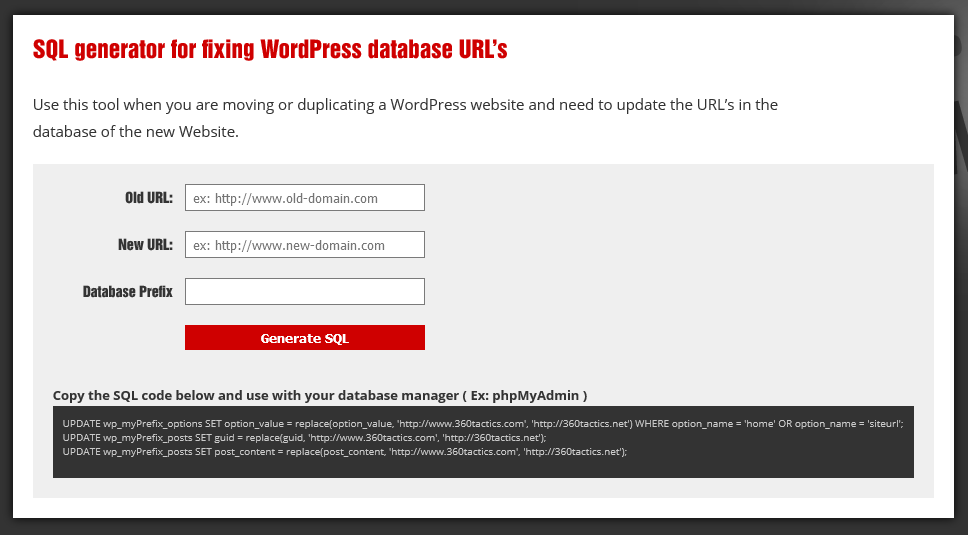
Feel free to bookmark the tool for your own use, or even send me feedback on how it could be improved.
It might not save a ton of time, but anytime we can cut down on repetition, we save ourselves the risk of errors and can quickly move on to more important tasks.